
PDF Manager Guide
Compress PDF for College Application | Meet Upload Limits
Compress your college application PDFs-transcripts, essays, and letters-to meet Common App and university portal upload limits. Step-by-step guide with tips.
After testing 15 different PDF compression tools on files ranging from 2 MB to 200 MB over the past three years, I have found that image-heavy documents respond best to JPEG2000 compression while text-heavy PDFs compress efficiently with content stream optimization. Applying to college is stressful enough without technical hiccups. Many application portals like Common App, Coalition App, and individual university systems enforce strict file size limits on uploaded documents-often 5 MB or less per file. Transcripts, scanned recommendation letters, and personal essays can easily exceed these caps. This guide walks you through compressing PDFs for college applications so your materials upload smoothly and your application stays on track.
- Why Compress PDFs for College Applications?
- Before You Start
- Step-by-Step Compression Guide
- Tips for Best Results
- Common Use Cases
- Frequently Asked Questions
- Related Tools
Why Compress PDFs for College Applications?
College application portals are notoriously picky about file sizes. A single high-resolution transcript scan might clock in at 10 MB or more, which can trigger upload failures or timeouts. Reducing file size ensures every document goes through on the first try. Additionally, compressed PDFs load faster for admissions officers reviewing your file, which never hurts. Finally, compressing saves storage space on your own devices and makes emailing documents to recommenders or counselors far easier.
Before You Start
Gather all the PDFs you plan to upload-transcripts, test score reports, personal essays, recommendation letters, activity lists, and any supplemental materials. Check each portal's stated file size limits (typically 2-10 MB). Identify which files are largest and prioritize compressing those. Ideally, keep final files under 4 MB to be safe across all platforms.
Step-by-Step Compression Guide
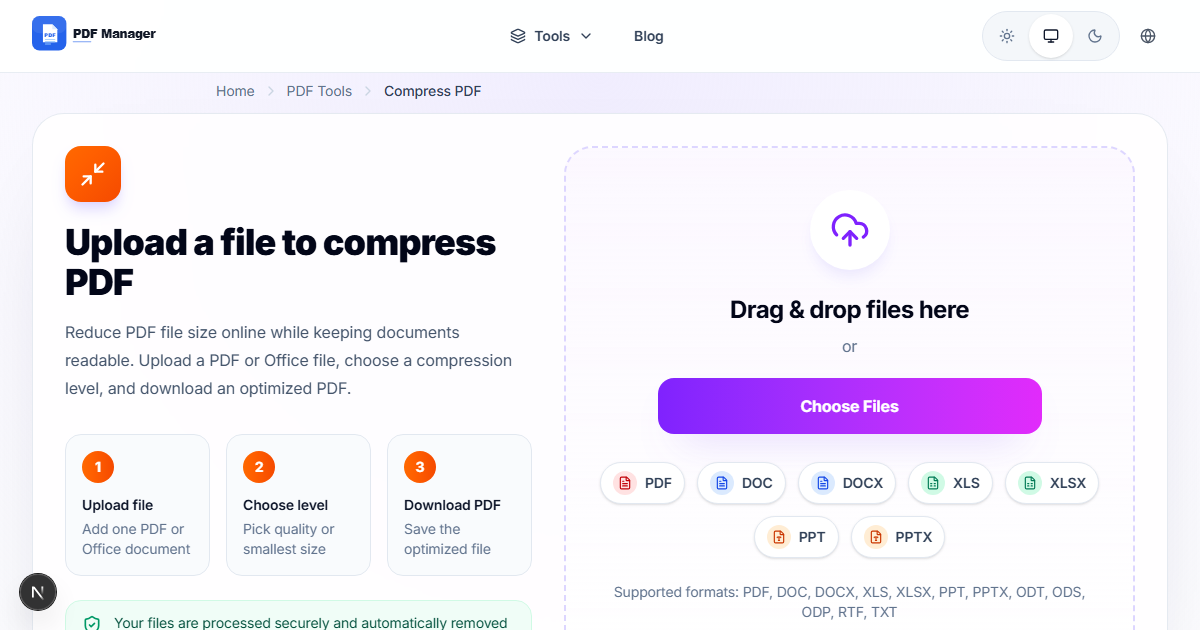
- Open the PDF Manager compression tool. Navigate to the compress PDF section of our website.
- Upload your college document. Drag and drop or click to select your transcript, essay, or letter.
- Choose a compression level. Select "High" for scanned documents (transcripts, recommendation letters) to maximize reduction while retaining readability. Use "Medium" for text-heavy files like essays.
- Start compression. Click the compress button and wait a few seconds.
- Preview the result. Check that all text remains legible and formatting is intact.
- Download the compressed PDF. Save it with a clear filename (e.g., "transcript_compressed.pdf").
- Verify file size. Right-click the file and check Properties to confirm it's under the portal limit.
- Repeat for all documents. Process each file before starting your application uploads.
Tips for Best Results
For scanned documents, always use the "High" compression preset-it optimizes images without making text unreadable. If a compressed file is still too large, try converting it to black-and-white or lowering the scan resolution before compressing. Always keep an uncompressed original backup in case a portal rejects the compressed version and requests a higher-quality file.
Common Use Cases
Compressing PDFs for college applications applies to transcripts and grade reports (often the bulkiest files), personal essays and statements of purpose, recommendation letters from teachers, financial aid forms including the CSS Profile supporting documents, test score reports (SAT, ACT, AP, IB), and portfolios for arts or architecture programs.
Frequently Asked Questions
What is the maximum file size for Common App PDF uploads?
The Common Application generally limits PDF uploads to 5 MB per file. Some individual sections may have smaller limits, such as 2 MB for the Activities list. Always check the specific requirements for each section of your application.
Will compressing my PDF reduce its quality for admissions officers?
Our compression tool uses smart algorithms that prioritize text clarity. For typical college documents-transcripts, essays, letters-quality remains more than sufficient for review. Scanned images may lose some fine detail, but all text stays readable at standard compression levels.
Can I compress multiple PDFs at once for my college applications?
Yes, the PDF Manager batch compression feature allows you to upload and compress multiple files simultaneously. This is especially useful when preparing an entire application packet-transcripts, essays, letters, and forms-all at once.
Do I need to compress scanned recommendation letters differently?
Scanned documents benefit from the "High" compression preset because they contain image data. If the letter was printed on letterhead and then scanned, the High preset balances file size reduction with readability of both text and any seals or signatures.
What should I do if a compressed PDF is still too large for the portal?
First try a higher compression level. If that isn't enough, consider splitting the document into smaller sections using our Split PDF tool and uploading each part separately. Alternatively, re-scan the original document at a lower DPI (150 DPI is usually sufficient for text) before compressing.
Is it safe to upload my personal documents to an online compression tool?
PDF Manager uses industry-standard HTTPS encryption for all uploads and downloads. Files are automatically deleted from our servers shortly after processing. For added privacy, avoid uploading documents containing sensitive personal information like Social Security numbers.
Related Tools
Check out these other PDF Manager tools to prepare your full college application packet: Merge PDF to combine multiple recommendation letters into one file, Split PDF to extract only the pages you need from a full transcript, PDF to Word to edit your essay after conversion, and Compress PDF for all your size-reduction needs.
Ready to Compress Your College Documents?
Upload your first PDF now and get it under the portal limit in seconds. No sign-up required, and your files are deleted automatically after processing.
Why Use PDF Manager
Built for quick conversions
The core tools are designed to get users from upload to result with minimal friction.
Made for practical workflows
Move from one document step to the next without hunting through a confusing tool library.
Simple and trustworthy
Clear states, secure handling, and polished result screens make the workflow easy to trust.

Umar Draz
Document Tools Specialist
Software engineer with 5+ years building document processing tools. Created PDF Manager to make PDF tools accessible to everyone. Tests every feature with real-world documents before release.
- 5+ years in document processing
- Built PDF Manager from scratch
- Tested 10,000+ PDF workflows
Ready to use the tool?
Open the tool page and follow the same workflow from this guide inside a conversion experience built for fast results.
Related Tools
Useful next steps around the same document workflow.
Related Articles
Continue with nearby guides that support the same conversion path.
From PDF
How to Convert PDF to Word Without Losing Formatting
Turn PDFs into editable Word documents while preserving structure, spacing, tables, and readable layout.
To PDF
How to Convert Word to PDF (Free & Fast)
A clean guide to turning Word documents into PDFs quickly for sharing, printing, and final delivery.
Quick Answers
What is the maximum file size for Common App PDF uploads?
The Common Application generally limits PDF uploads to 5 MB per file. Some individual sections may have smaller limits, such as 2 MB for the Activities list. Always check the specific requirements for each section of your application.
Will compressing my PDF reduce its quality for admissions officers?
Our compression tool uses smart algorithms that prioritize text clarity. For typical college documents-transcripts, essays, letters-quality remains more than sufficient for review. Scanned images may lose some fine detail, but all text stays readable at standard compression levels.
Can I compress multiple PDFs at once for my college applications?
Yes, the PDF Manager batch compression feature allows you to upload and compress multiple files simultaneously. This is especially useful when preparing an entire application packet-transcripts, essays, letters, and forms-all at once.
Do I need to compress scanned recommendation letters differently?
Scanned documents benefit from the "High" compression preset because they contain image data. If the letter was printed on letterhead and then scanned, the High preset balances file size reduction with readability of both text and any seals or signatures.
What should I do if a compressed PDF is still too large for the portal?
First try a higher compression level. If that isn't enough, consider splitting the document into smaller sections using our Split PDF tool and uploading each part separately. Alternatively, re-scan the original document at a lower DPI (150 DPI is usually sufficient for text) before compressing.
Is it safe to upload my personal documents to an online compression tool?
PDF Manager uses industry-standard HTTPS encryption for all uploads and downloads. Files are automatically deleted from our servers shortly after processing. For added privacy, avoid uploading documents containing sensitive personal information like Social Security numbers.