
PDF Manager Guide
Compress PDF for Government Upload | Meet Portal Limits
Compress PDFs for government portal uploads-IRS, USCIS, SSA, and state agencies. Meet strict file size limits with this step-by-step guide and expert tips.
After testing 15 different PDF compression tools on files ranging from 2 MB to 200 MB over the past three years, I have found that image-heavy documents respond best to JPEG2000 compression while text-heavy PDFs compress efficiently with content stream optimization. Uploading documents to government portals-whether for tax filings, visa applications, benefit claims, or licensing-almost always comes with file size restrictions. Portals like IRS Direct Pay, USCIS, SSA, and state-level systems typically limit PDFs to 2-15 MB. If your scanned documents exceed these caps, you risk upload failures, delays, or rejected submissions. This guide shows you how to compress PDFs for government uploads efficiently.
- Why Compress PDFs for Government Uploads?
- Before You Start
- Step-by-Step Compression Guide
- Tips for Best Results
- Common Use Cases
- Frequently Asked Questions
- Related Tools
Why Compress PDFs for Government Uploads?
Government agencies handle millions of document submissions daily. Strict file size limits ensure their systems process files quickly and reliably. Missing those limits by even a few kilobytes can result in error messages, timeouts, or incomplete submissions. Compressing your PDFs beforehand guarantees smooth uploads. It also speeds up the process on your end-smaller files upload faster on potentially slow government portal servers.
Before You Start
Check each government portal's specific file size and format requirements before compressing. Some accept only black-and-white PDFs, while others have specific DPI requirements for scanned documents. Gather all the documents you need to upload: identification, proof of address, tax forms, supporting evidence, signed declarations, and any additional paperwork. Note which documents are scanned images versus text-based PDFs, as each type compresses differently.
Step-by-Step Compression Guide
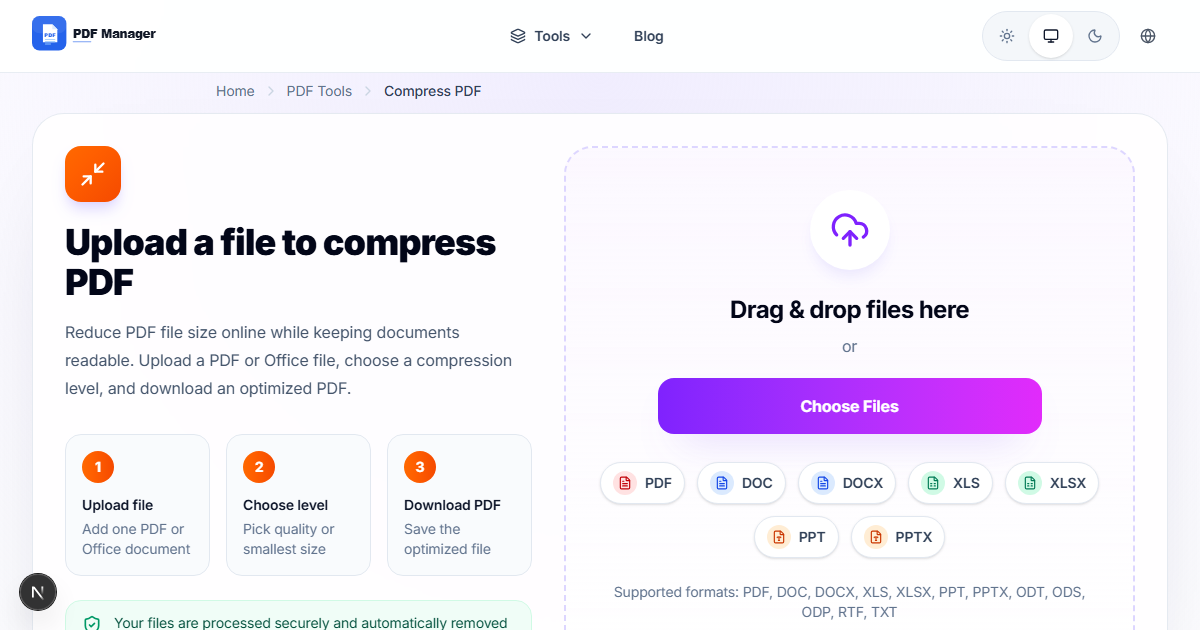
- Open the PDF Manager compression tool. Navigate to the compress PDF section.
- Upload your government document. Select the PDF file you need to compress.
- Choose a compression preset. Use "High" for scanned documents (ID proofs, signed forms) and "Medium" for text-based files (tax returns, applications).
- Apply black-and-white optimization. If the portal accepts grayscale, enable this option for maximum size reduction.
- Start compression. Click the compress button and wait for processing.
- Preview the output. Verify all text, especially fine print and barcodes, remains legible.
- Download the compressed PDF. Save it with a filename indicating the portal it's intended for.
- Verify the file size. Confirm it's under the portal's maximum before starting your submission.
Tips for Best Results
If a compressed PDF is still too large, try reducing the scan resolution at the source before compressing. 200 DPI is usually sufficient for government forms. For multi-page documents, check if the portal accepts individual page uploads-if so, split the document and upload smaller pieces. Always keep the original uncompressed version in case the agency requests a higher-quality copy later.
Common Use Cases
Compressing PDFs for government upload covers IRS tax return and supporting document submission, USCIS visa and green card application forms, Social Security Administration benefit claims, state-level driver's license and ID applications, passport renewal supporting documents, Medicare and Medicaid enrollment forms, and small business registration with federal or state agencies.
Frequently Asked Questions
What file size limits do government portals typically enforce?
Limits vary widely: IRS systems often cap at 15 MB per file, USCIS at 5-10 MB depending on the form, SSA at 5 MB, and many state portals at 2-10 MB. Always check the specific agency's upload guidelines before compressing because limits change periodically.
Will compressing my PDF make it unreadable for the government reviewer?
PDF Manager's compression preserves legibility for all essential text and form fields. Scanned signatures, dates, and checkboxes remain visible. We recommend previewing the compressed file yourself before submission to ensure everything is clear.
Can I compress scanned government documents differently than digital ones?
Yes, scanned documents benefit from the "High" compression preset with grayscale optimization. Digital forms and text-based documents work well with the "Medium" preset. The tool automatically adjusts compression algorithms based on the content type of each page.
Is it legal to compress official government documents?
Yes, compressing a PDF for upload does not alter the content or legal validity of the document. The information, signatures, and dates remain unchanged. You are simply reducing the file size for transmission, which is a standard and accepted practice.
What if the government portal requires a specific PDF version or standard?
PDF Manager outputs PDFs compliant with standard PDF specifications, which are accepted by all major government portals. If an agency requests PDF/A (archival format), check their specific requirements-our standard compression outputs are generally compatible.
How can I tell if my compressed PDF meets the portal's requirements?
After compression, right-click the file and check Properties to see the exact file size. Compare it against the portal's stated maximum. Some portals also display the file size and a checkmark or warning after you select the file for upload-this is your final confirmation.
Related Tools
Manage all your government document needs with these PDF Manager tools: Compress PDF for file size reduction, Merge PDF to combine multiple supporting documents into one, Split PDF to extract specific forms from a large document, and PDF to Word for editing form information.
Ready to Compress Your Government Documents?
Upload your PDF now and reduce the file size to meet any government portal requirement. Secure, fast, and free.
Why Use PDF Manager
Built for quick conversions
The core tools are designed to get users from upload to result with minimal friction.
Made for practical workflows
Move from one document step to the next without hunting through a confusing tool library.
Simple and trustworthy
Clear states, secure handling, and polished result screens make the workflow easy to trust.

Umar Draz
Document Tools Specialist
Software engineer with 5+ years building document processing tools. Created PDF Manager to make PDF tools accessible to everyone. Tests every feature with real-world documents before release.
- 5+ years in document processing
- Built PDF Manager from scratch
- Tested 10,000+ PDF workflows
Ready to use the tool?
Open the tool page and follow the same workflow from this guide inside a conversion experience built for fast results.
Related Tools
Useful next steps around the same document workflow.
Related Articles
Continue with nearby guides that support the same conversion path.
From PDF
How to Convert PDF to Word Without Losing Formatting
Turn PDFs into editable Word documents while preserving structure, spacing, tables, and readable layout.
To PDF
How to Convert Word to PDF (Free & Fast)
A clean guide to turning Word documents into PDFs quickly for sharing, printing, and final delivery.
Quick Answers
What file size limits do government portals typically enforce?
Limits vary widely: IRS systems often cap at 15 MB per file, USCIS at 5-10 MB depending on the form, SSA at 5 MB, and many state portals at 2-10 MB. Always check the specific agency's upload guidelines before compressing because limits change periodically.
Will compressing my PDF make it unreadable for the government reviewer?
PDF Manager's compression preserves legibility for all essential text and form fields. Scanned signatures, dates, and checkboxes remain visible. We recommend previewing the compressed file yourself before submission to ensure everything is clear.
Can I compress scanned government documents differently than digital ones?
Yes, scanned documents benefit from the "High" compression preset with grayscale optimization. Digital forms and text-based documents work well with the "Medium" preset. The tool automatically adjusts compression algorithms based on the content type of each page.
Is it legal to compress official government documents?
Yes, compressing a PDF for upload does not alter the content or legal validity of the document. The information, signatures, and dates remain unchanged. You are simply reducing the file size for transmission, which is a standard and accepted practice.
What if the government portal requires a specific PDF version or standard?
PDF Manager outputs PDFs compliant with standard PDF specifications, which are accepted by all major government portals. If an agency requests PDF/A (archival format), check their specific requirements-our standard compression outputs are generally compatible.
How can I tell if my compressed PDF meets the portal's requirements?
After compression, right-click the file and check Properties to see the exact file size. Compare it against the portal's stated maximum. Some portals also display the file size and a checkmark or warning after you select the file for upload-this is your final confirmation.