
PDF Manager Guide
How to Compress PDF for Email | Reduce Size Before Sending
Learn how to compress PDF files for email attachments. Reduce PDF size below email limits while keeping quality intact. Free online PDF compressor guide.
- Why Compress PDFs for Email
- Email Size Limits Explained
- Method 1: Online PDF Compression
- Method 2: Desktop Software
- Step-by-Step Guide
- Understanding Compression Levels
- Tips for Best Results
- Frequently Asked Questions
Why Compress PDFs for Email
Email providers impose strict attachment size limits, typically 10MB to 25MB. Large PDF files often exceed these limits, resulting in bounced messages or failed deliveries. Compressing your PDF before sending ensures it reaches the recipient without issues and reduces upload and download times significantly.
Email Size Limits Explained
Gmail allows attachments up to 25MB, Outlook.com supports 20MB, and Yahoo Mail has a 25MB limit. However, many corporate email servers enforce smaller limits, sometimes as low as 5MB. Compressing your PDF to under 5MB is a safe practice for universal compatibility.
Method 1: Online PDF Compression
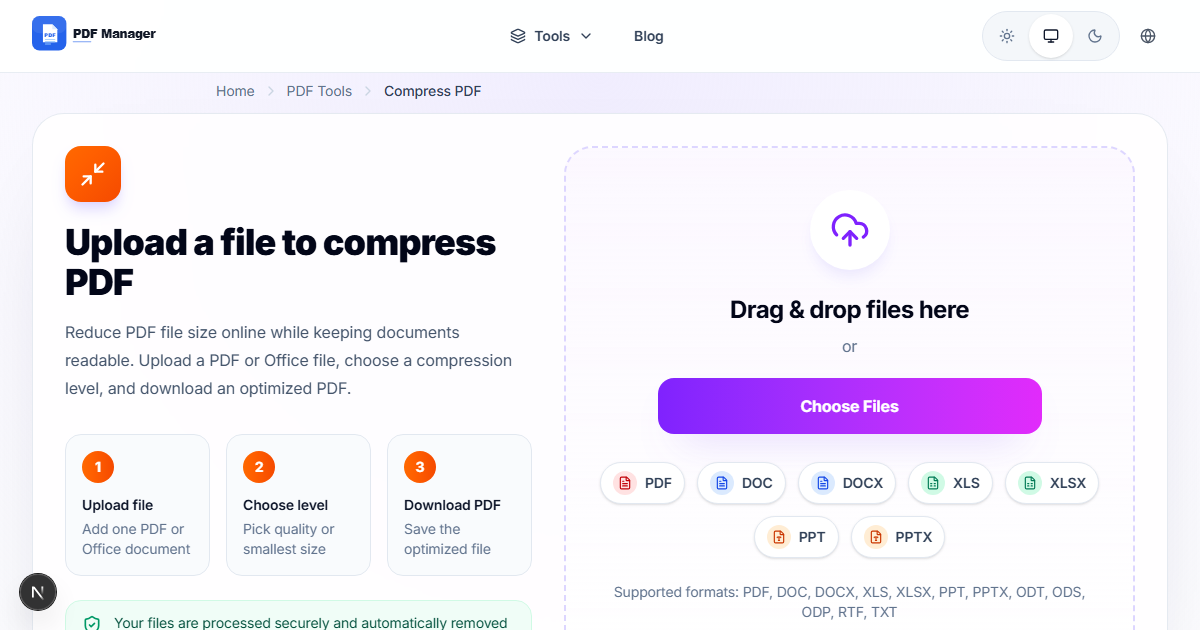
Using a web-based tool like PDF Manager Compress is the easiest way to reduce PDF size. Simply upload your file, choose a compression level, and download the result. No software installation is needed, and the process takes only a few seconds.
Method 2: Desktop Software
Adobe Acrobat Pro offers advanced PDF compression with customizable settings. You can reduce file size by removing unnecessary elements like embedded fonts, metadata, and high-resolution images. Free alternatives like PDFsam and Ghostscript also provide compression capabilities.
Step-by-Step Guide
- Go to PDF Manager's Compress PDF page.
- Click Upload and select the PDF file you want to compress.
- Choose a compression level: Low (minimal reduction), Medium (balanced), or High (maximum reduction).
- Click Compress and wait for the processing to complete.
- Preview the compressed file and check the size reduction percentage.
- Download the compressed PDF to your device.
- Attach the compressed file to your email and send.
Understanding Compression Levels
Low compression reduces file size by 20-30% with no visible quality loss. Medium compression achieves 40-60% reduction while maintaining good quality for screen viewing. High compression reduces size by 60-80% but may show minor quality degradation, suitable for text-heavy documents.
Tips for Best Results
Convert images to grayscale before creating the PDF for smaller file sizes. Remove unnecessary pages before compressing. Use high compression for text-only documents and low compression for documents with important graphics. Always preview the compressed file before sending to verify quality.
Frequently Asked Questions
What is the maximum PDF size for email attachments?
Most email providers allow attachments up to 25MB, but the effective limit after encoding is around 20MB. For reliable delivery, compress your PDF to under 10MB, or ideally under 5MB for corporate email systems.
Does PDF compression lose quality?
Modern compression tools use smart algorithms that reduce file size while preserving visual quality. Text and line art remain sharp, while images may see minor compression artifacts at high compression levels.
Can I compress a PDF without installing software?
Yes, online tools like PDF Manager allow you to compress PDFs directly from your browser without any installation. Your files are encrypted during upload and automatically deleted after processing.
How much can I compress a PDF file?
Typical compression ratios range from 30% to 80% depending on the content. Image-heavy PDFs compress more than text-only documents. PDF Manager typically achieves 50-70% reduction on mixed content files.
Is it safe to compress PDF online for email?
Yes, reputable services use SSL encryption and automatically delete files after processing. For sensitive documents, consider using desktop software or a tool that processes files locally in your browser.
Why is my compressed PDF still too large for email?
If the file remains too large, try removing or downsampling high-resolution images before compression, splitting the PDF into smaller parts, or converting the document to a text-based format like Word.
Related Tools
Use Merge PDF to combine documents before compression, Split PDF to divide large files, and PDF to Word for editable text extraction.
Start Compressing Your PDFs
Compress your PDF files now with our free online PDF compressor. No registration needed, and your files are deleted automatically after processing.
Why Use PDF Manager
Built for quick conversions
The core tools are designed to get users from upload to result with minimal friction.
Made for practical workflows
Move from one document step to the next without hunting through a confusing tool library.
Simple and trustworthy
Clear states, secure handling, and polished result screens make the workflow easy to trust.

Umar Draz
Document Tools Specialist
Software engineer with 5+ years building document processing tools. Created PDF Manager to make PDF tools accessible to everyone. Tests every feature with real-world documents before release.
- 5+ years in document processing
- Built PDF Manager from scratch
- Tested 10,000+ PDF workflows
Ready to use the tool?
Open the tool page and follow the same workflow from this guide inside a conversion experience built for fast results.
Related Tools
Useful next steps around the same document workflow.
Related Articles
Continue with nearby guides that support the same conversion path.
From PDF
How to Convert PDF to Word Without Losing Formatting
Turn PDFs into editable Word documents while preserving structure, spacing, tables, and readable layout.
To PDF
How to Convert Word to PDF (Free & Fast)
A clean guide to turning Word documents into PDFs quickly for sharing, printing, and final delivery.
Quick Answers
What is the maximum PDF size for email attachments?
Most email providers allow attachments up to 25MB, but the effective limit after encoding is around 20MB. For reliable delivery, compress your PDF to under 10MB, or ideally under 5MB for corporate email systems.
Does PDF compression lose quality?
Modern compression tools use smart algorithms that reduce file size while preserving visual quality. Text and line art remain sharp, while images may see minor compression artifacts at high compression levels.
Can I compress a PDF without installing software?
Yes, online tools like PDF Manager allow you to compress PDFs directly from your browser without any installation. Your files are encrypted during upload and automatically deleted after processing.
How much can I compress a PDF file?
Typical compression ratios range from 30% to 80% depending on the content. Image-heavy PDFs compress more than text-only documents. PDF Manager typically achieves 50-70% reduction on mixed content files.
Is it safe to compress PDF online for email?
Yes, reputable services use SSL encryption and automatically delete files after processing. For sensitive documents, consider using desktop software or a tool that processes files locally in your browser.
Why is my compressed PDF still too large for email?
If the file remains too large, try removing or downsampling high-resolution images before compression, splitting the PDF into smaller parts, or converting the document to a text-based format like Word.