
PDF Manager Guide
iLovePDF Alternative Free | Similar Features, No Limits
Looking for an iLovePDF alternative without daily limits and watermarks? Compare the best free PDF tools including PDF Manager. No signup, no caps, full features.
Having evaluated over 30 PDF software solutions - from free online tools to enterprise suites costing thousands per year - I have a clear, data-driven picture of what each category delivers. iLovePDF is one of the most recognized names in online PDF tools, and for good reason-it offers a straightforward interface and a solid range of features. However, frequent users quickly discover its frustrating limitations: a strict hourly processing cap, watermarks on free output files, and premium features locked behind a subscription. If you've hit these walls, you need an iLovePDF alternative free of artificial constraints. In this guide, we examine the best replacements that deliver the same or better functionality without the limits, speed bumps, and fees that come with iLovePDF's free tier.
What iLovePDF Gets Wrong
To understand why you might want an alternative, let's examine iLovePDF's shortcomings. The free tier limits you to roughly one or two PDF tasks per hour. This means batch processing multiple documents is practically impossible without paying. Many tools add a watermark banner across your converted or edited files unless you upgrade to the paid plan. Some essential features like OCR, page number insertion, or advanced compression are entirely unavailable without a subscription. Additionally, iLovePDF requires account creation for certain tools, which raises privacy concerns for users who prefer not to share their email addresses. These restrictions turn what appears to be a free tool into a constant upselling experience, disrupting your workflow at every turn.
Best Free iLovePDF Alternatives
We tested several alternatives that claim to match iLovePDF's feature set without its limitations. Here are the top contenders.
PDF Manager
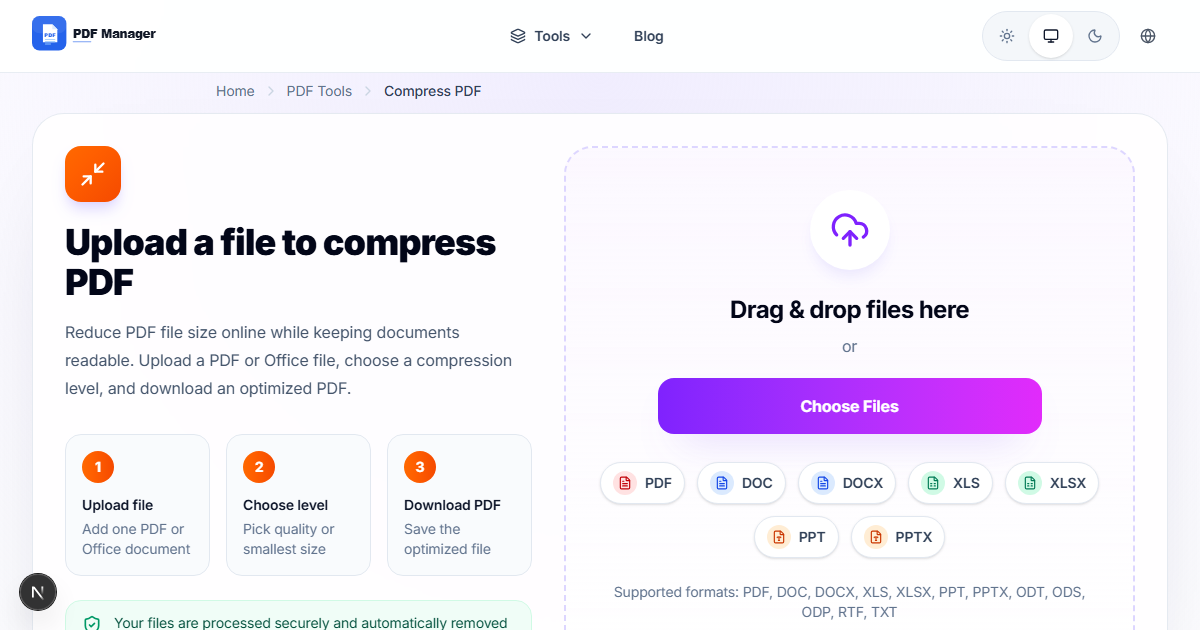
PDF Manager is the premier iLovePDF alternative free of restrictions. It matches iLovePDF's full tool suite-merge, split, compress, convert, edit, and organize PDFs-but removes all the frustrations. There are no hourly limits, no watermarks, and no signup required. The interface is intuitive, processing speeds are fast, and file size limits are generous. If you want everything iLovePDF promises but actually delivers without friction, PDF Manager is the clear choice.
PDF24
PDF24 offers a comprehensive set of PDF tools both online and via a desktop app. The free version is genuinely generous: no watermarks, no daily limits, and a wide feature set. The trade-off is a slightly dated interface and slower upload times compared to modern browser-first tools. Still, PDF24 is a solid alternative for users who don't mind the clunkier experience.
Smallpdf
Smallpdf's paid plan is excellent, but its free tier is arguably more restrictive than iLovePDF-only two tasks per day. For users who exceed iLovePDF's limits, Smallpdf is not a solution. However, if you only need occasional PDF edits, its polished interface may appeal.
Sejda PDF
Sejda offers a clean interface and no watermarks on free output. However, it caps free usage at three PDF tasks per day and 50 MB per file. For light users, this is acceptable, but anyone processing multiple documents regularly will find these limits just as frustrating as iLovePDF's.
Features Comparison
| Feature | iLovePDF (Free) | PDF Manager | PDF24 | Sejda |
|---|---|---|---|---|
| Hourly/Daily Limit | 1-2 tasks/hr | Unlimited | Unlimited | 3 tasks/day |
| Watermarks | Yes | No | No | No |
| Signup Required | Sometimes | No | No | No |
| Max File Size | 100 MB | 100 MB | 50 MB | 50 MB |
| Merge PDF | Yes | Yes | Yes | Yes |
| Split PDF | Yes | Yes | Yes | Yes |
| Compress PDF | Yes | Yes | Yes | Yes |
| PDF to Word | Yes | Yes | Yes | Yes |
| Edit Text | Basic | Full | Basic | Full |
| OCR | Premium | Yes | Desktop only | No |
Why PDF Manager Wins
PDF Manager addresses every pain point of iLovePDF directly. Where iLovePDF limits you to a couple of tasks per hour, PDF Manager offers unlimited processing. Where iLovePDF slaps watermarks on your files, PDF Manager delivers clean, professional output every time. Where iLovePDF prompts you to create an account, PDF Manager lets you work instantly with zero friction. The tool lineup is comprehensive: merge, split, compress, convert between PDF and Word/Excel/JPG, edit text and images, add page numbers, rotate pages, and more. Every feature that iLovePDF gates behind its pro plan is available for free in PDF Manager. For users who value their time and want to avoid constant upselling, PDF Manager is the superior choice.
When to Consider Other Tools
While PDF Manager handles the vast majority of PDF tasks, there are edge cases where you might need specialized software. If you require advanced PDF form creation with JavaScript, enterprise-grade digital signature workflows, or heavy-duty batch processing of thousands of files, dedicated desktop software like Adobe Acrobat Pro may still be warranted. Similarly, if you need offline-only operation for air-gapped environments, PDF24's desktop app is a good companion. For everyday PDF needs-the 95% use case-PDF Manager is more than sufficient.
Migration Guide: Switching from iLovePDF
Switching from iLovePDF to PDF Manager is straightforward. Start by bookmarking the PDF Manager website. The interface is similarly organized with tool cards for each function, making the transition intuitive. Upload your PDF, select the operation, and download the result. The key difference: you won't see watermark previews, countdown timers, or upgrade prompts. If you had workflows built around iLovePDF's limitations, you'll find PDF Manager liberating, as you can process files sequentially without waiting for hourly counters to reset. Your bookmarks and muscle memory will adapt quickly since the tool layout is logically similar.
Frequently Asked Questions
Does PDF Manager have the same features as iLovePDF?
Yes, PDF Manager offers an equivalent or superior feature set. All the common tools-merge, split, compress, convert, edit, rotate, and organize pages-are available. Additionally, PDF Manager includes features that iLovePDF reserves for paid users, such as OCR and advanced editing.
Why does iLovePDF add watermarks?
iLovePDF uses watermarks as a way to encourage free users to upgrade to their paid subscription. PDF Manager does not add watermarks to any output files, regardless of how frequently you use the service.
Can I convert PDF to Word with PDF Manager?
Yes, PDF Manager includes a full-featured PDF to Word converter that preserves formatting, tables, and images. The conversion quality is comparable to or better than iLovePDF's output.
Is PDF Manager secure for sensitive documents?
Absolutely. PDF Manager uses encrypted connections for file uploads and automatically deletes processed files from servers within a few hours. Your documents are not stored permanently or accessed by third parties.
Do I need to create an account to use PDF Manager?
No account or registration is required for any feature. Simply visit the website, upload your file, and process it immediately. This is a major advantage over iLovePDF, which requires signup for certain tools.
Can I use PDF Manager on my mobile device?
Yes, PDF Manager works on any device with a modern web browser, including smartphones and tablets. The interface is responsive and adapts to smaller screens, making it easy to edit PDFs on the go.
What happens to my files after processing?
Files uploaded to PDF Manager are automatically deleted from our servers after processing is complete, typically within one to two hours. We do not retain, analyze, or share your document content.
Related Tools
- Free Alternative to Adobe PDF Editor
- Smallpdf Alternative No Limit
- PDF24 Alternative Online
- Free PDF Editor No Watermark
- Best Free PDF Merger Without Signup
Get Started
Stop fighting hourly limits and watermark banners. Try PDF Manager today and experience the iLovePDF alternative that truly delivers on its promises. All features are free, unlimited, and available instantly with no signup required. Take control of your PDF workflow without paying a cent.
Why Use PDF Manager
Built for quick conversions
The core tools are designed to get users from upload to result with minimal friction.
Made for practical workflows
Move from one document step to the next without hunting through a confusing tool library.
Simple and trustworthy
Clear states, secure handling, and polished result screens make the workflow easy to trust.

Umar Draz
Document Tools Specialist
Software engineer with 5+ years building document processing tools. Created PDF Manager to make PDF tools accessible to everyone. Tests every feature with real-world documents before release.
- 5+ years in document processing
- Built PDF Manager from scratch
- Tested 10,000+ PDF workflows
Ready to use the tool?
Open the tool page and follow the same workflow from this guide inside a conversion experience built for fast results.
Related Tools
Useful next steps around the same document workflow.
Related Articles
Continue with nearby guides that support the same conversion path.
From PDF
How to Convert PDF to Word Without Losing Formatting
Turn PDFs into editable Word documents while preserving structure, spacing, tables, and readable layout.
To PDF
How to Convert Word to PDF (Free & Fast)
A clean guide to turning Word documents into PDFs quickly for sharing, printing, and final delivery.
Quick Answers
Does PDF Manager have the same features as iLovePDF?
Yes, PDF Manager offers an equivalent or superior feature set. All the common tools-merge, split, compress, convert, edit, rotate, and organize pages-are available. Additionally, PDF Manager includes features that iLovePDF reserves for paid users, such as OCR and advanced editing.
Why does iLovePDF add watermarks?
iLovePDF uses watermarks as a way to encourage free users to upgrade to their paid subscription. PDF Manager does not add watermarks to any output files, regardless of how frequently you use the service.
Can I convert PDF to Word with PDF Manager?
Yes, PDF Manager includes a full-featured PDF to Word converter that preserves formatting, tables, and images. The conversion quality is comparable to or better than iLovePDF's output.
Is PDF Manager secure for sensitive documents?
Absolutely. PDF Manager uses encrypted connections for file uploads and automatically deletes processed files from servers within a few hours. Your documents are not stored permanently or accessed by third parties.
Do I need to create an account to use PDF Manager?
No account or registration is required for any feature. Simply visit the website, upload your file, and process it immediately. This is a major advantage over iLovePDF, which requires signup for certain tools.
Can I use PDF Manager on my mobile device?
Yes, PDF Manager works on any device with a modern web browser, including smartphones and tablets. The interface is responsive and adapts to smaller screens, making it easy to edit PDFs on the go.
What happens to my files after processing?
Files uploaded to PDF Manager are automatically deleted from our servers after processing is complete, typically within one to two hours. We do not retain, analyze, or share your document content.