
PDF Manager Guide
Reduce PDF File Size Below 2MB | Quick Compression Guide
Learn proven techniques to reduce PDF file size below 2MB. Compress large PDFs for email, uploads, and storage with free tools and optimization tips.
- Why Aim for Under 2MB
- Before You Begin
- Method 1: Online Compression
- Method 2: Image Optimization
- Method 3: Remove Unnecessary Elements
- Step-by-Step Guide
- Advanced Techniques
- Frequently Asked Questions
Why Aim for Under 2MB
Many systems enforce a 2MB file size limit for email attachments, document uploads, and web forms. Keeping your PDFs under 2MB ensures compatibility with these restrictions. It also speeds up upload and download times, reduces storage costs, and makes documents easier to share via messaging apps that have file size caps.
Before You Begin
Check your current PDF size by viewing file properties. Identify what contributes most to the file size: high-resolution images, embedded fonts, scanned pages, or complex vector graphics. This helps you choose the most effective compression strategy for your specific document.
Method 1: Online Compression
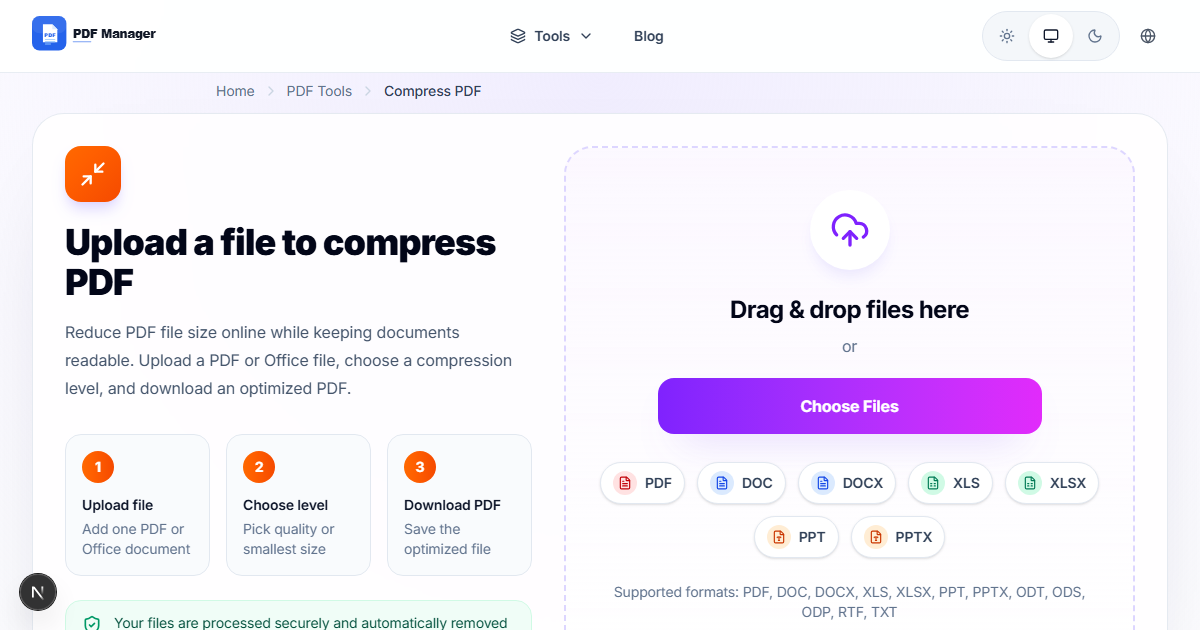
PDF Manager's Compress PDF tool can reduce most PDFs well below 2MB in seconds. Choose the High compression setting for maximum reduction. The tool automatically optimizes images, removes redundant data, and applies efficient encoding while preserving readability.
Method 2: Image Optimization
Images are the biggest contributor to PDF file size. Reduce image resolution to 150 DPI for screen viewing, convert color images to grayscale when color is unnecessary, use JPEG compression for photographs, and consider replacing complex images with simpler graphics where possible.
Method 3: Remove Unnecessary Elements
PDFs often contain hidden elements that inflate file size. Remove unused pages, strip embedded fonts that can be substituted with standard fonts, delete metadata and annotations, flatten form fields, and remove redundant layers or objects that are not visible in the document.
Step-by-Step Guide
- Check the current size of your PDF file.
- Open PDF Manager's Compress PDF tool.
- Upload your PDF and select High compression.
- Download the compressed version and check its size.
- If still over 2MB, remove unnecessary pages using Split PDF.
- Convert images to grayscale and reduce resolution to 150 DPI.
- Remove embedded fonts and metadata from the PDF.
- Use Save As Optimized PDF in advanced tools.
- Repeat compression until file size is under 2MB.
- Verify the document quality is still acceptable.
Advanced Techniques
For stubborn files, convert the PDF to Word, remove heavy elements, and reconvert to PDF. Use PDF/A format which strips non-essential data. For scanned documents, reduce scan resolution to 200 DPI before creating the PDF. Remove OCR data after text extraction if the file contains both image and text layers.
Frequently Asked Questions
How do I make a PDF under 2MB for free?
Use PDF Manager's free online compressor with High compression setting. Most PDFs under 50 pages can be reduced below 2MB. Combine with page removal if needed.
What if compression alone doesn't reach 2MB?
Combine compression with other techniques: reduce image resolution, remove unnecessary pages, strip embedded fonts, and convert color images to grayscale. These steps together can achieve significant additional reduction.
Will reducing PDF size below 2MB affect quality?
Text quality remains excellent at high compression settings. Images may show minor compression artifacts but remain readable. For documents where image quality is critical, use medium compression and focus on other optimization techniques.
Can I reduce scanned PDFs below 2MB?
Scanned PDFs are inherently larger because each page is a full image. Reduce scan resolution to 200 DPI, use black and white scanning for text-only documents, and apply high JPEG compression to scanned images.
How small can a typical PDF be compressed?
A text-only 10-page PDF can be compressed to under 500KB. A 10-page document with a few images typically compresses to 1-2MB. Image-heavy documents may require additional optimization to reach 2MB.
Does PDF compression work on mobile devices?
Yes, PDF Manager's online compressor works on any device with a browser, including iOS and Android. Upload files directly from your phone's storage and download compressed versions.
Related Tools
Use Split PDF to divide large documents before compressing, Merge PDF to combine files after optimization, and PDF to Word to remove heavy elements in an editable format.
Compress Your PDF Under 2MB
Use our free PDF compressor to reduce your file size below 2MB instantly. No signup required, and your files are deleted automatically.
Why Use PDF Manager
Built for quick conversions
The core tools are designed to get users from upload to result with minimal friction.
Made for practical workflows
Move from one document step to the next without hunting through a confusing tool library.
Simple and trustworthy
Clear states, secure handling, and polished result screens make the workflow easy to trust.

Umar Draz
Document Tools Specialist
Software engineer with 5+ years building document processing tools. Created PDF Manager to make PDF tools accessible to everyone. Tests every feature with real-world documents before release.
- 5+ years in document processing
- Built PDF Manager from scratch
- Tested 10,000+ PDF workflows
Ready to use the tool?
Open the tool page and follow the same workflow from this guide inside a conversion experience built for fast results.
Related Tools
Useful next steps around the same document workflow.
Related Articles
Continue with nearby guides that support the same conversion path.
From PDF
How to Convert PDF to Word Without Losing Formatting
Turn PDFs into editable Word documents while preserving structure, spacing, tables, and readable layout.
To PDF
How to Convert Word to PDF (Free & Fast)
A clean guide to turning Word documents into PDFs quickly for sharing, printing, and final delivery.
Quick Answers
How do I make a PDF under 2MB for free?
Use PDF Manager's free online compressor with High compression setting. Most PDFs under 50 pages can be reduced below 2MB. Combine with page removal if needed.
What if compression alone doesn't reach 2MB?
Combine compression with other techniques: reduce image resolution, remove unnecessary pages, strip embedded fonts, and convert color images to grayscale. These steps together can achieve significant additional reduction.
Will reducing PDF size below 2MB affect quality?
Text quality remains excellent at high compression settings. Images may show minor compression artifacts but remain readable. For documents where image quality is critical, use medium compression and focus on other optimization techniques.
Can I reduce scanned PDFs below 2MB?
Scanned PDFs are inherently larger because each page is a full image. Reduce scan resolution to 200 DPI, use black and white scanning for text-only documents, and apply high JPEG compression to scanned images.
How small can a typical PDF be compressed?
A text-only 10-page PDF can be compressed to under 500KB. A 10-page document with a few images typically compresses to 1-2MB. Image-heavy documents may require additional optimization to reach 2MB.
Does PDF compression work on mobile devices?
Yes, PDF Manager's online compressor works on any device with a browser, including iOS and Android. Upload files directly from your phone's storage and download compressed versions.